
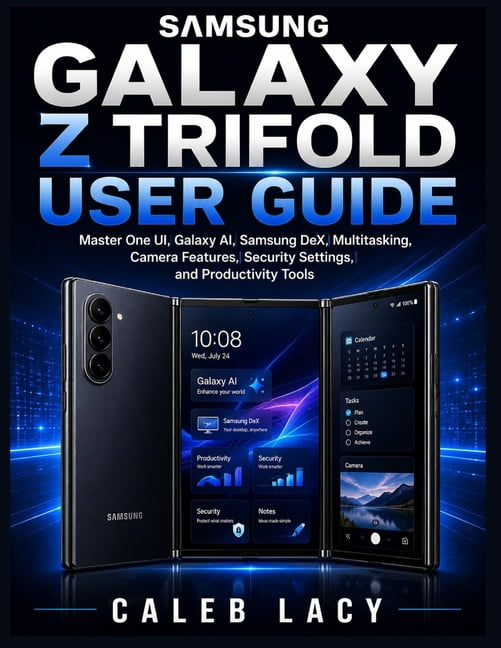
Samsung Galaxy Z Trifold User Guide: Master One UI, Galaxy AI, Samsung DeX, Multitasking, Camera Features, Security Sett, (Paperback)
Product details
| Management number | 238818766 | Release Date | 2026/07/11 | List Price | US$6.40 | Model Number | 238818766 | ||
|---|---|---|---|---|---|---|---|---|---|
| Category | |||||||||
<p>Have you just purchased the Samsung Galaxy Z Trifold and feel overwhelmed by its innovative features, advanced settings, and unique triple-fold design?</p><p>You're not alone.</p><p>The Samsung Galaxy Z Trifold is one of the most powerful and sophisticated smartphones ever created. With its expansive foldable display, Galaxy AI capabilities, multitasking features, Samsung DeX desktop experience, advanced camera system, and extensive customization options, it offers incredible possibilities. However, many users never unlock its full potential because they struggle to understand where to begin, how to configure key settings, or how to take advantage of the device's most powerful tools.</p><p>That's where the Samsung Galaxy Z Trifold User Guide comes in.</p><p>This comprehensive, step-by-step manual is designed to help both beginners and experienced Galaxy users confidently navigate every aspect of the device. Whether you're setting up your phone for the first time, exploring Galaxy AI features, mastering multitasking on the trifold display, or optimizing performance for everyday use, this guide provides clear instructions and practical insights that make learning easy.</p><p>Inside this book, you'll discover how to: </p><p>- Set up and customize your Samsung Galaxy Z Trifold with confidence</p><p>- Master One UI and personalize your smartphone experience</p><p>- Navigate the unique triple-fold display and maximize productivity</p><p>- Use Galaxy AI tools such as Circle to Search, Live Translate, Interpreter Mode, Note Assist, and Chat Assist</p><p>- Capture stunning photos and videos using advanced camera features</p><p>- Take advantage of Samsung DeX to create a desktop-like workspace</p><p>- Organize files, photos, videos, and cloud storage efficiently</p><p>- Improve multitasking using split-screen, pop-up windows, and drag-and-drop functionality</p><p>- Strengthen security with Samsung Knox, Secure Folder, fingerprint recognition, and privacy controls</p><p>- Optimize battery life, storage, memory, and overall device performance</p><p>- Troubleshoot common issues and uncover hidden features that most users never discover</p><p>More importantly, this guide helps you move beyond simply owning the device to truly mastering it. Instead of feeling frustrated by unfamiliar settings and complex features, you'll gain the knowledge and confidence needed to use your Samsung Galaxy Z Trifold efficiently, securely, and productively every day.</p><p>Whether you're a first-time Samsung user, a longtime Galaxy enthusiast, a business professional, a student, or someone who simply wants to get the most value from their investment, this book will serve as your trusted companion and go-to reference.</p><p>The Samsung Galaxy Z Trifold is built to transform the way you work, communicate, create, and stay connected. Don't settle for using only a fraction of what it can do.</p><p>Get your copy of Samsung Galaxy Z Trifold User Guide today and start unlocking the full power of your device with confidence, clarity, and ease.</p>
- Samsung Galaxy Z Trifold User Guide: Master One UI, Galaxy AI, Samsung DeX, Multitasking, Camera Features, Security Sett, (Paperback)
- Author: Caleb Lacy
- ISBN: 9798181790452
- Format: Paperback
- Publication Date: 2026-06-18
- Page Count: 204
| Book format | Paperback |
|---|---|
| Fiction/nonfiction | Non-Fiction |
| Genre | Computing & Internet |
| Publication date | June, 2026 |
| Pages | 204 |
| Subgenre | Operating Systems |
| Series title | No Series |
| Number in series | 0 |
| Edition | 1 |
| Publisher | Amazon Digital Services LLC - Kdp |
| Language | English |
| Is collectible | N |
| Recording time | 0 min |
| Retail packaging | Single Piece |
| Assembled product dimensions (l x w x h) | 8.50 x 0.43 x 11.00 in |
| Assembled product weight | 1.07 lb |
| Bisac subject heading | Computers |
Bestseller ranking
All Books






Customers who viewed this product also viewed
Halloween Trees



Correction of product information
If you notice any omissions or errors in the product information on this page, please use the correction request form below.
Correction Request Form